
Calendar scheduling, built on WooCommerce Subscriptions
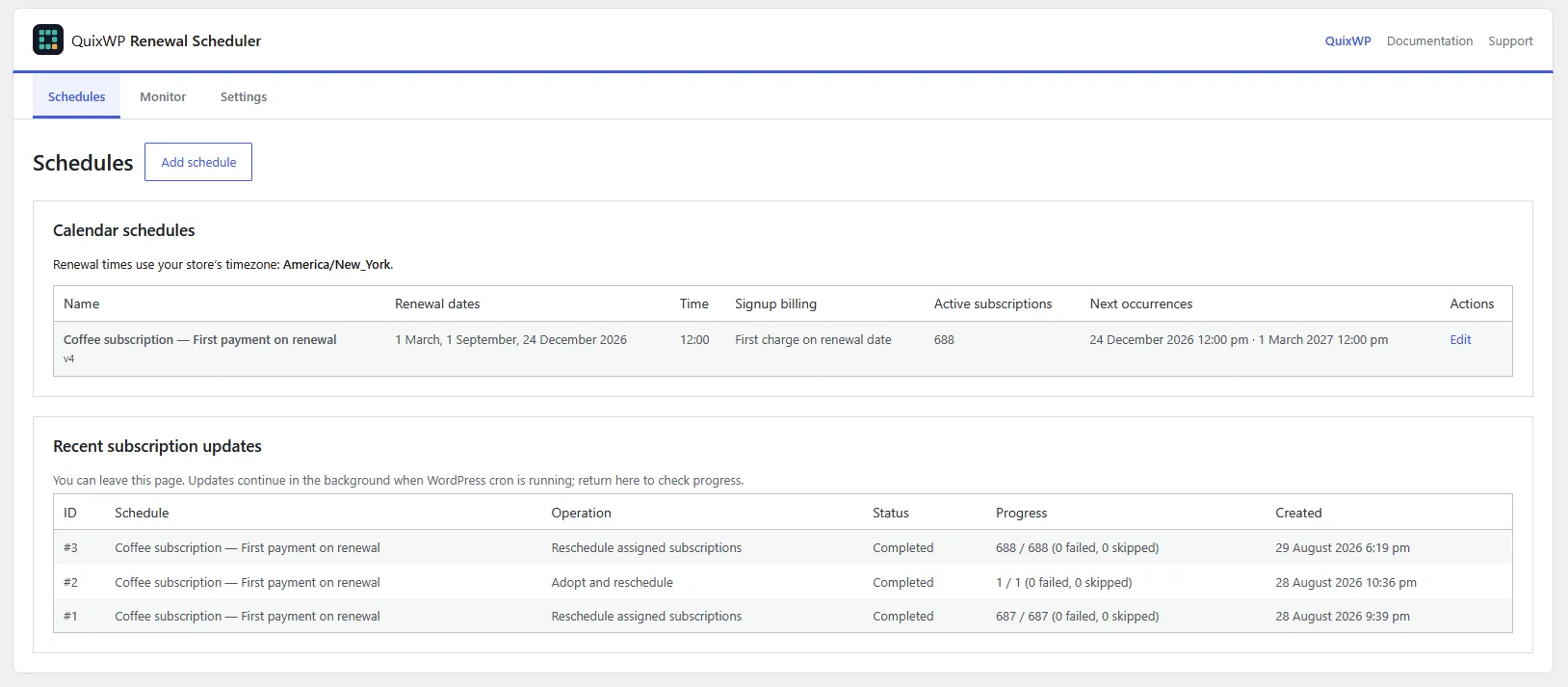
Renewal Scheduler gives selected subscription products a shared calendar instead of relying only on each customer's signup anniversary. Use recurring month/day dates, one-off dates with a year, or both in one schedule.
The official WooCommerce Subscriptions extension is required. It remains responsible for subscription records, payment methods, renewal orders and payment processing. QuixWP controls calendar dates; it does not replace your payment gateway or create a separate charging system.
Still deciding whether you need a calendar extension? Compare native Billing Date Alignment with specific calendar-date renewals before setting up a schedule.
Quick start
- Install the dependencies and activate your Pro licence on a safe test store first.
- Open WooCommerce → Renewal Scheduler → Schedules and select Add schedule.
- Name the schedule, enter annual and/or exact dates, then choose the store-local renewal time and signup billing mode.
- For a single target time, set Processing window to 0. Save the schedule.
- Assign it to a subscription product using the product's Renewal schedule selector.
- Run the simulator, then test checkout and a renewal using sandbox payments. Use the Monitor tab to review the result.
Already have subscribers? Product assignment alone does not move their dates. Choose adoption or Shop Plugins import, then decide separately whether to realign existing payment dates.
Installation and licence
| Component | Minimum version |
|---|---|
| WordPress | 6.0 |
| WooCommerce | 7.0 |
| Official WooCommerce Subscriptions (affiliate link) | 7.8.2 or newer — installed and active |
| PHP | 7.4 |
These are minimum requirements, not a promise that every combination of extensions has been tested. Verify your WooCommerce, Subscriptions, checkout, gateway and order-storage setup on staging before upgrading or going live. The plugin declares HPOS compatibility; test any HPOS migration separately.
- Activate WooCommerce and WooCommerce Subscriptions.
- Go to Plugins → Add New → Upload Plugin, upload the QuixWP ZIP, install and activate it.
- Complete the Freemius licence activation flow. If prompted, open WooCommerce → Renewal Scheduler → Activate licence.
There is one paid Pro plan. Schedule management, simulation, import, monitoring and new checkout assignments require feature-enabled Pro access, or a trial if offered. If access expires, the installed, active plugin continues handling previously assigned subscriptions using their saved calendars; it does not adopt new subscriptions from product settings. Deactivating the plugin is different and stops its calendar hooks.
Annual dates, exact dates, or both
Every schedule has a name, a list of dates and one shared renewal hour and minute. It must contain at least one valid date of either type.
Recurring annual dates
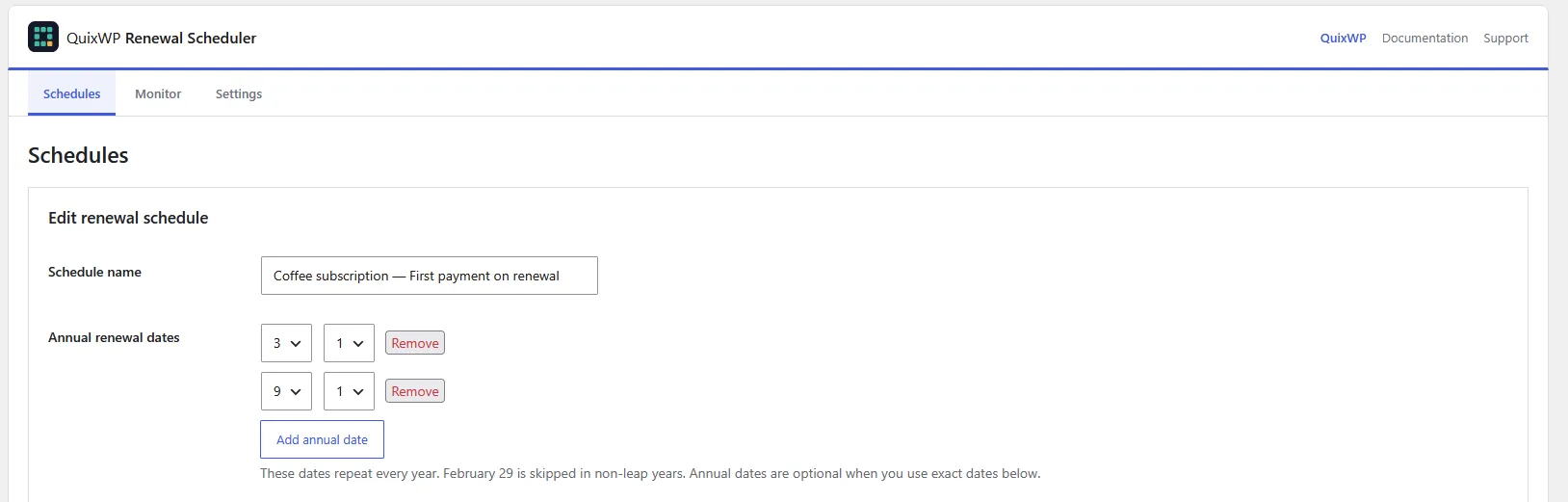
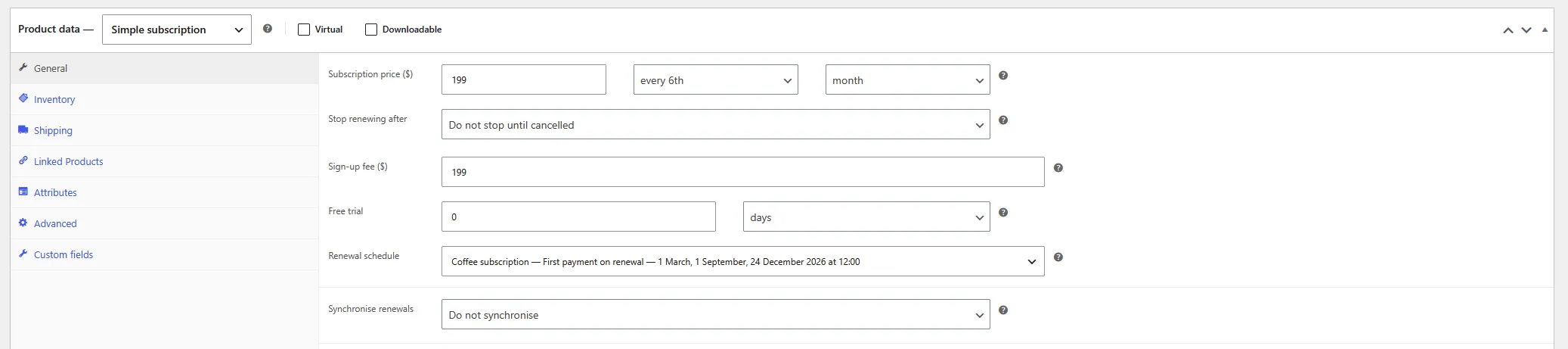
Enter a month and day for dates that repeat each year. The Coffee subscription example below uses March 1 and September 1. Set the renewal time separately. February 29 runs only in valid leap years; it is not moved to March 1.
Mix annual dates with year-specific dates
An exact date occurs once in the selected year. This is useful for holidays whose dates move: enter each year's date yourself. The plugin does not calculate Easter or Thanksgiving automatically.
Christmas & Easter
Every year: December 25.
Exact dates: March 28, 2027 and April 16, 2028.
The next eligible occurrence is selected from the combined calendar.
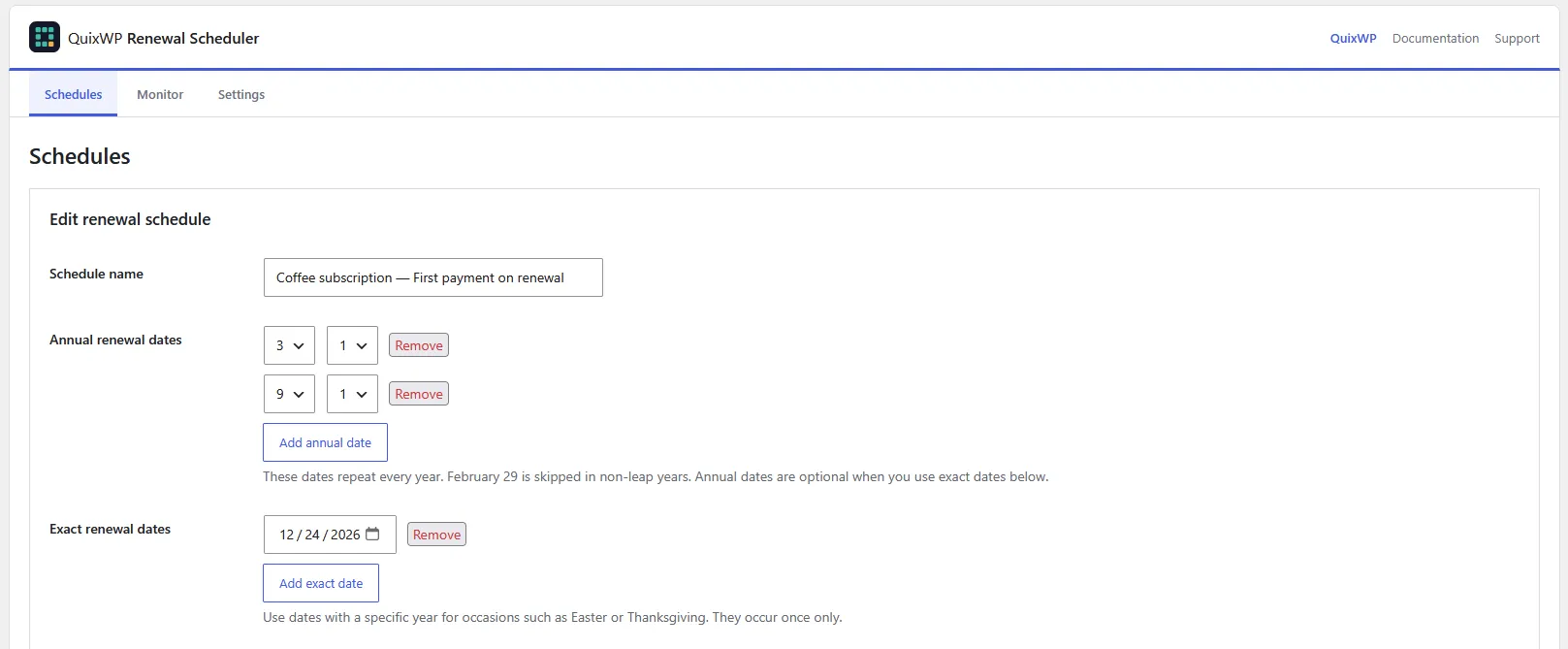
The screenshot below shows another combination: March 1 and September 1 every year, plus December 24, 2026 as a one-off date.
Exact dates only
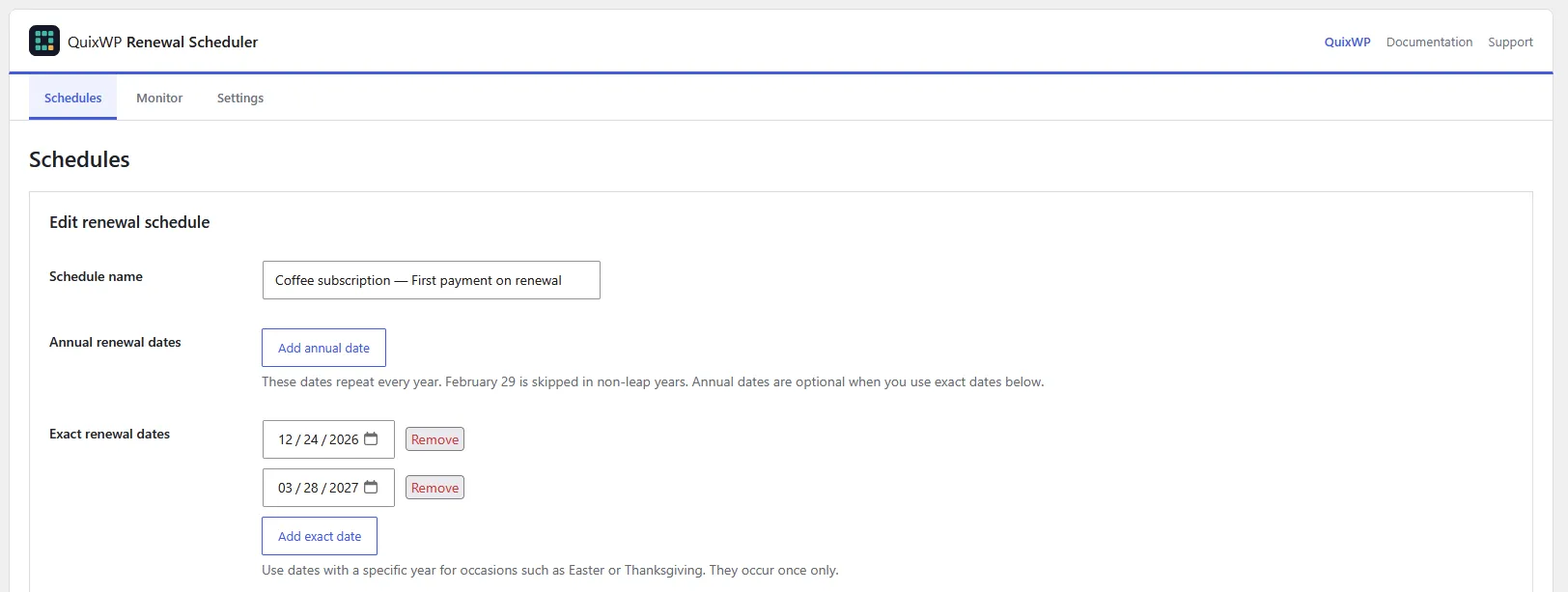
Remove every annual row and add your year-specific dates. Save and reopen the schedule to confirm the list. No annual date is required, and you can add one later with Add annual date.
After the final exact date
For an exact-only calendar, the final successful renewal clears the subscription's next-payment date through WooCommerce. The subscription stays active: status and access are not automatically ended. Add future dates and explicitly realign active subscriptions if you want renewals to resume.
New purchases are blocked when no future occurrence exists. Manual realignment against an exhausted calendar preserves existing payment dates rather than inventing a replacement. A mixed calendar continues on its annual dates.
Timezone and same-day cutoff
Dates use the WordPress store timezone shown in the editor, not your browser's timezone. Confirm it in Settings → General → Timezone; a named city timezone accounts for daylight-saving changes. 00:00 means midnight at the start of the selected date; 12:00 means noon.
The next occurrence must be strictly after the reference time. A signup before today's configured time can use today's occurrence; at or after that time it moves to the next eligible one. Product trials can also affect eligibility—test your actual product.
Choose signup billing deliberately
| Mode | What happens |
|---|---|
| Charge immediately, then renew on the next date | The recurring amount is charged at signup, then again on the next eligible calendar date. |
| No recurring charge at signup; first charge on the next date | The first recurring amount is deferred. A WooCommerce Subscriptions sign-up fee can still be payable immediately. |
With a July 1 / September 1 calendar and no product trial, an immediate-billing signup on June 30 is charged on June 30 and renews on July 1. A July 5 signup renews on September 1 after its signup charge.
Two close payments can be intentional, not duplicates. Immediate billing does not skip the next occurrence or automatically prorate the short first period. Make the payment terms clear to customers before checkout.

Assign products and variations
- Edit a Simple subscription product under Products.
- In Product data → General, select the calendar in Renewal schedule.
- Update the product and test a new checkout.
For a Variable subscription, set a parent schedule or expand a variation and select its own calendar. Inherit parent schedule uses the parent's assignment. On the parent, No fixed renewal schedule leaves it without a QuixWP calendar.
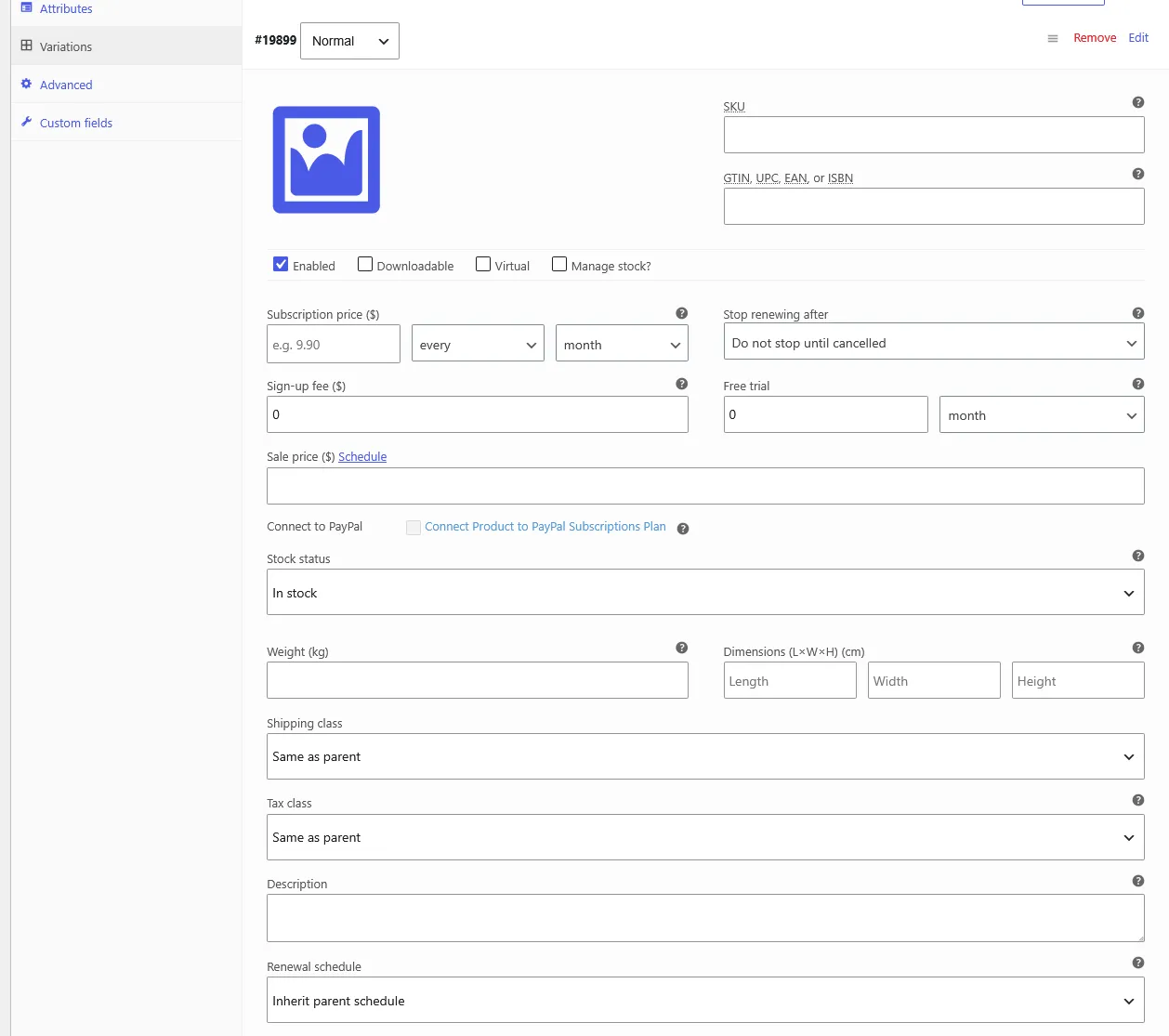
Assignments are used for new subscription resolution. They do not silently reassign existing subscribers. Incompatible schedule combinations are not resolved by arbitrarily choosing a calendar; test mixed carts, variations, resubscriptions and switches used by your store.
Preview with the schedule simulator
In the schedule editor, scroll to Schedule simulator. Enter a hypothetical signup date/time and estimated active-subscription population, then select Run simulation.
The simulator reads unsaved form values and previews signup billing, upcoming occurrences and processing-window behaviour. Try signups just before, exactly at, and just after a renewal time; also test the final exact date and daylight-saving boundaries.
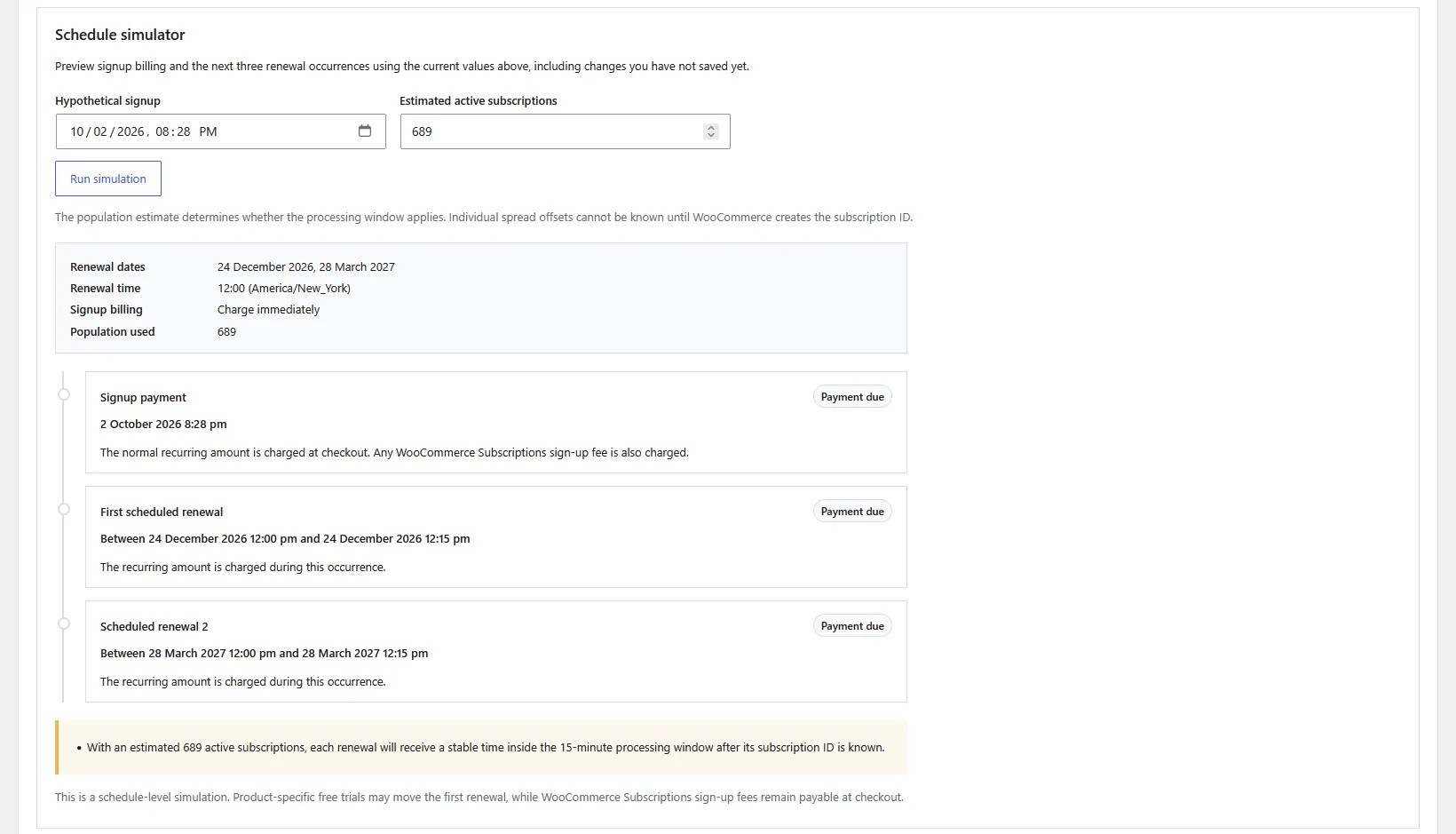
This does not create an order, charge a payment or change a subscription. It is a schedule-level preview, not a replacement for checkout testing with product-specific trials, fees and your gateway.
Adopt existing active subscriptions
Use adoption when you have created a QuixWP calendar and want to attach existing subscriptions containing its assigned products, without importing another scheduler.
- Assign the calendar to the relevant products or variations.
- Edit the schedule and find Adopt existing subscriptions from assigned products.
- Review assigned-product, unassigned-candidate and already-assigned counts.
- Choose the mode, then select Adopt matching subscriptions.
- Assign schedule only; preserve each current next-payment date: takes over eligible subscriptions without moving their current dates. After that renewal succeeds, subsequent renewals follow the calendar.
- Assign schedule and reschedule immediately: moves eligible next-payment dates as the batches process. Review the target dates first.
The screenshot shows the no-candidates state: all matching active subscriptions are already assigned. Adoption mode controls appear only when eligible unassigned subscriptions are available.

Only eligible active, unassigned subscriptions are considered. Subscriptions assigned to another QuixWP schedule or containing products from conflicting QuixWP schedules are skipped. Deactivate any previous scheduling plugin before this handover.
Realign dates explicitly
Saving a calendar and moving existing payment dates are separate decisions. After editing dates, time or processing settings, use either:
- Queue a background update after saving when saving the schedule; or
- Align active subscriptions to this schedule now in the saved schedule's Schedule actions panel.
Review the confirmation, including the affected population and target occurrence. Eligible subscriptions are updated in batches through WooCommerce's date APIs. Individual early overrides and processing offsets can produce different effective timestamps.
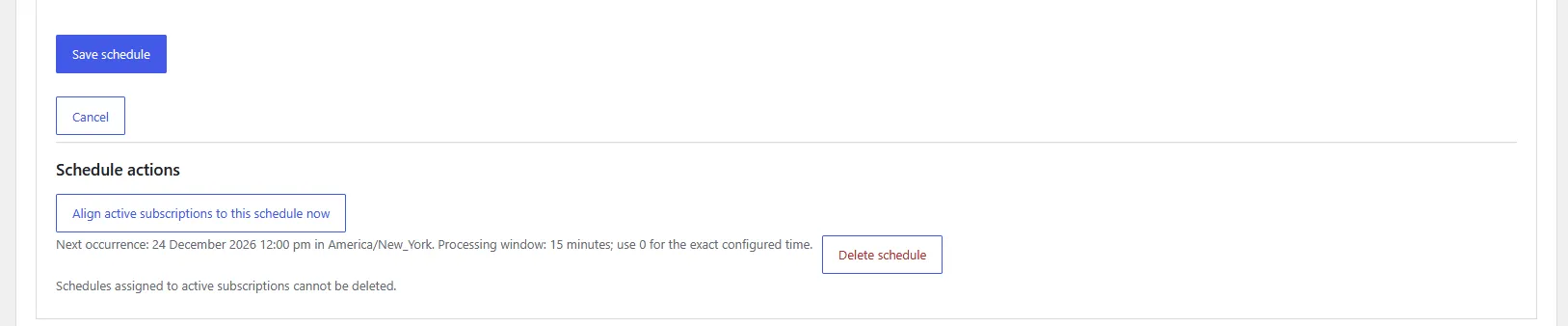
Realignment changes payment dates; it is not an “invoice retry” or “charge now” button. Do not use it to resolve an unpaid renewal without first reviewing the order, retry state and gateway outcome.
Review Recent subscription updates for completion, failure and skip counts. Check the Monitor afterwards. Historical cancelled subscriptions are not bulk realigned.
Import from WooCommerce Subscriptions Schedule by Shop Plugins
The importer transfers supported legacy schedule definitions, product assignments and subscription assignments inside the official WooCommerce Subscriptions system. Existing next-payment dates are preserved.
- Back up the database and rehearse the migration on a protected staging copy. Choose a quiet period away from due renewals.
- Open Settings → Import from WooCommerce Subscriptions Schedule. The panel appears when supported legacy schedule data is detected.
- Select Import legacy schedules and review the progress and final counts.
- Check imported calendars, signup billing and product assignments. Compare representative subscription dates before and after import.
- If you want a common new date/time, perform a separate, deliberate realignment after validating the import.

What happens to the old scheduler?
The importer attempts to deactivate woocommerce-subscriptions-schedule/woocommerce-subscriptions-schedule.php before processing subscription assignments. If that retirement cannot be completed safely, assignment processing stops. The old plugin's database settings remain for rollback; do not reactivate it alongside QuixWP for the same subscriptions.
Cleanup targets only the legacy wcss_schedule_next_payment_date_update hook. It does not remove WooCommerce's legitimate woocommerce_scheduled_subscription_payment actions. Status includes the legacy-plugin deactivation and removed-action counts; zero can mean the plugin was already inactive or no legacy date-update actions remained.
Other migration paths
This version does not include an automatic converter for WooCommerce Subscriptions' built-in Billing Date Alignment. Review that configuration separately, then create and adopt a QuixWP calendar deliberately. It also does not migrate subscriptions from separate engines such as YITH, WebToffee or WP Swings.
Run one subscription earlier
In a saved schedule, open Individual subscription timing. Enter the ID of an active subscription already assigned to that schedule, and a value from 0 to 30 for Days before schedule.
Select Save override and realign subscription to move that subscription's next date. The screenshot shows a one-day override: September 1 at noon becomes August 31 at noon. A two-day override would move it to August 30, before any processing offset.
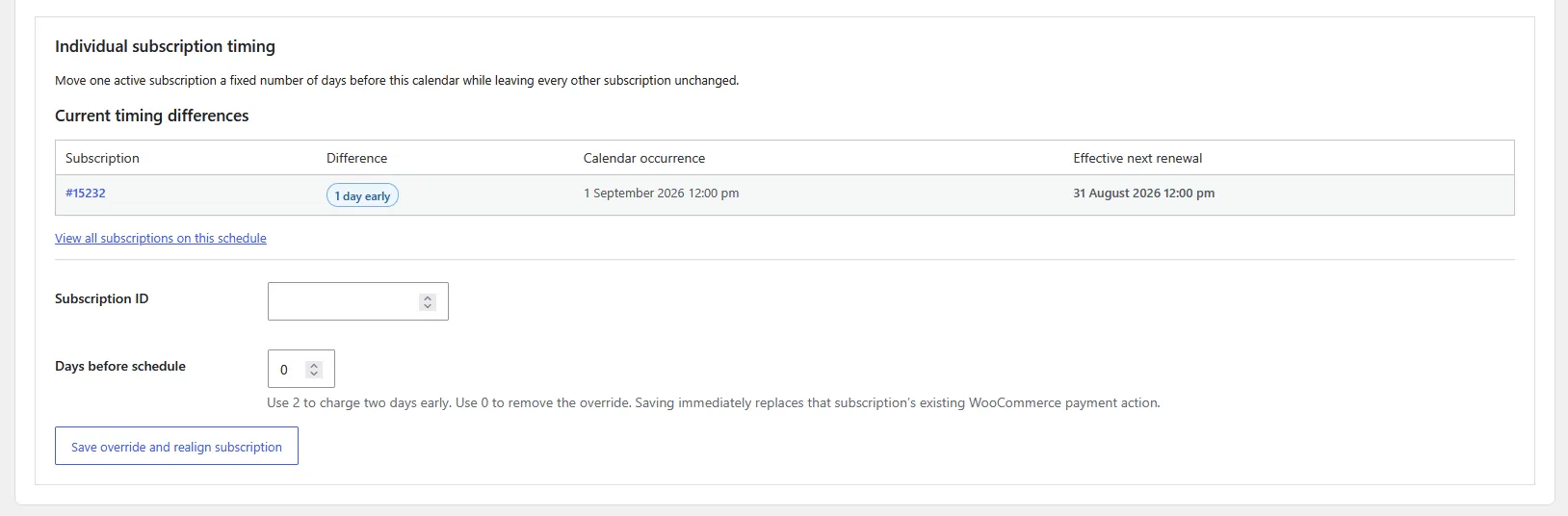
This is a persistent calendar-day offset, not a one-time arbitrary date override. It applies to later occurrences too. Use 0 to remove it and realign to standard timing. Elapsed advanced occurrences are skipped; verify the resulting next date before relying on it.
Read the Monitor
Open WooCommerce → Renewal Scheduler → Monitor. Filter by schedule or subscription ID. The paginated list shows active subscriptions assigned to QuixWP schedules, not every historical subscription or order.
The screenshot uses fictional customers and illustrative renewal states, not a live store's payment report.
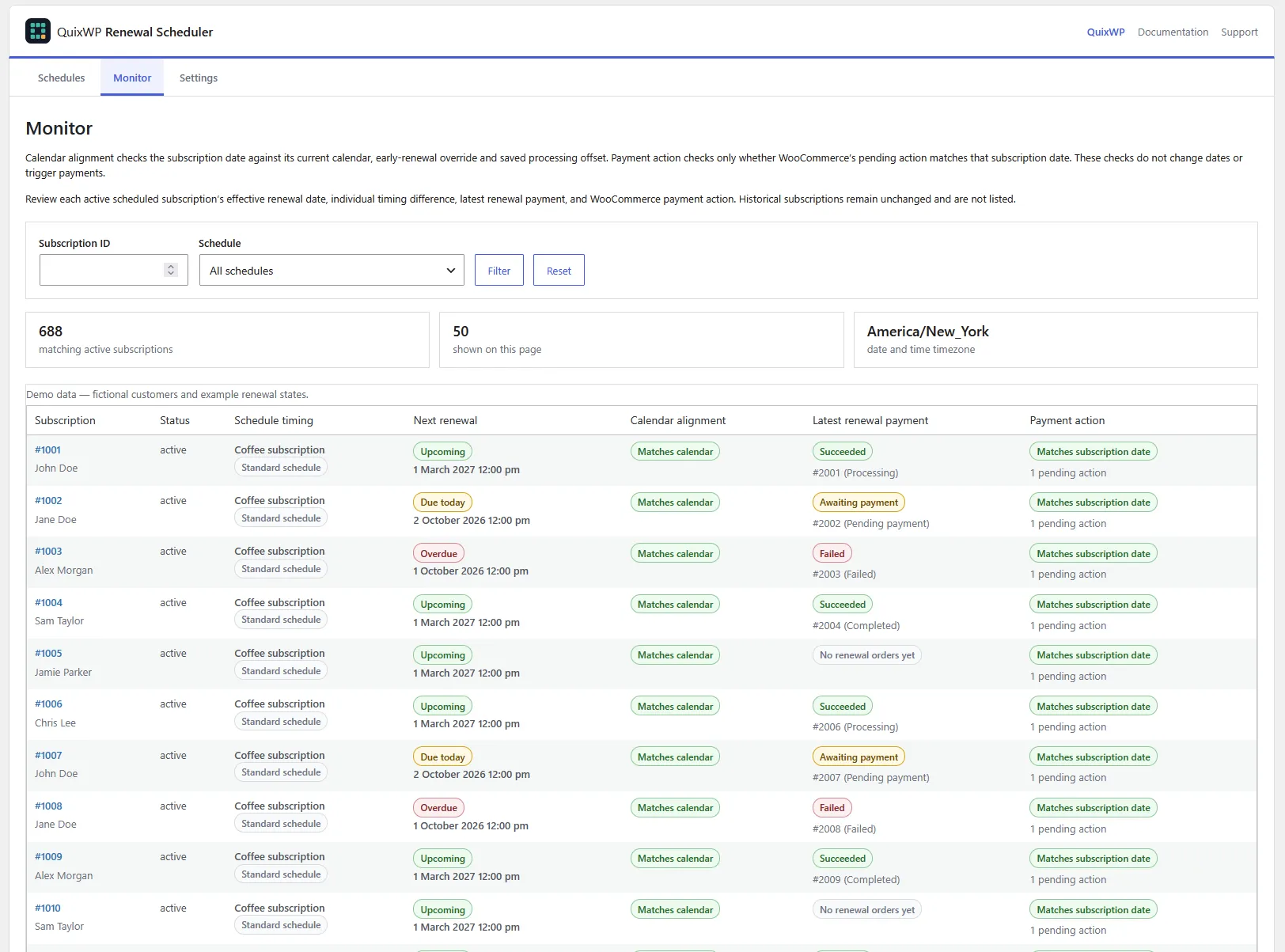
| Check | What it tells you |
|---|---|
| Next renewal | The saved date and its due state: upcoming, due today, overdue today, overdue or no next payment. |
| Calendar alignment | Whether the date matches the current calendar with its saved early override and processing offset. |
| Latest renewal payment | The latest related renewal order: succeeded, failed, awaiting payment, none or check order. This is not a full payment-history audit. |
| Payment action | Whether a pending WooCommerce payment action matches the subscription date, is missing, duplicated, mismatched or unexpected. |
These checks are independent. A March 1 payment at 01:14 can show Matches subscription date for its action but Off-calendar date/time for a midnight calendar. A preserved imported date can also be intentionally off-calendar. An overdue date may still match its calendar.
The Monitor is read-only. It neither repairs dates nor triggers charges. During active processing, inspect the subscription, renewal order and queue together before treating a missing pending action as a fault. An exact-only schedule that has finished may legitimately have no next payment.
Processing windows, background updates and cron
Control when renewals become due
Set Processing window to 0 to give renewals the configured target time. A positive number of minutes spreads eligible renewals through a window beginning at that time when the population is above Spread only above. For example, a 15-minute window beginning at midnight distributes target times through that window—it does not guarantee all payments finish within 15 minutes.
Can I leave the page?
Yes, while the plugin has the required Pro access and WordPress cron is running. Import, adoption and realignment save progress and queue background batches. Keeping the page open also processes batches through authenticated browser requests. Background and browser processing share a lock. If a legacy import stalls, use Resume stalled import to continue saved progress.
Scheduled time is not completion time
Cron frequency, Action Scheduler backlog, server capacity and gateway response times determine actual processing speed. A server cron can provide reliable triggering without waiting for storefront traffic. Ask your host to configure it for the correct site's wp-cron.php, confirm it runs successfully, and only then consider disabling traffic-triggered WP-Cron. Do not copy another store's filesystem command.
Inspect the Scheduled Actions screen under WooCommerce → Status, or Tools → Scheduled Actions where available. Do not delete legitimate payment actions to “clean up” the queue, and do not increase worker concurrency without host and gateway capacity testing.
Failed payments
WooCommerce Subscriptions and the gateway remain responsible for failed-payment handling. If automatic retries are enabled and supported for that payment, their retry process applies. QuixWP does not add a separate retry engine or guarantee that every failed payment will retry. Check the renewal order notes and retry settings rather than realigning dates to retry a charge.
Data retention and uninstall
Under Settings → Data settings, leave Delete schedules, update runs and plugin metadata when the plugin is uninstalled unchecked to retain plugin data. Enabling it opts into cleanup during uninstall, not ordinary deactivation.

Take a backup and plan the handover before uninstalling. Cleanup does not cancel WooCommerce subscriptions or remove legitimate WooCommerce scheduled-payment actions. Removing the plugin also removes its future calendar calculations.
Before going live
- Keep staging payment protection enabled and use gateway sandbox credentials. Do not enable live automatic payments on a copied store.
- Confirm the store timezone, midnight/noon choice, billing mode, calendar dates and processing window.
- Test an ordinary signup, a signup close to renewal, a successful renewal and a failed-payment scenario.
- Check that a successful renewal advances to the intended later occurrence, including any persistent early override.
- For a migration, compare saved dates and payment actions, check all progress counts and ensure only one scheduler controls the subscriptions.
- Check order totals, addresses, shipping, emails and accounting integrations separately; a correct calendar does not validate downstream fulfilment.
- Verify cron and queue health. A scheduled midnight renewal does not promise a midnight payment completion.
Troubleshooting
The licence screen appears instead of the schedule editor
Confirm the required plugins are active and your Freemius licence has Pro feature access. Existing saved assignments can continue while management is restricted; activating a licence restores access to the tools.
Imported subscriptions still have different times
That is expected: import preserves dates. Review the calendar, then explicitly realign eligible active subscriptions if changing those times is intended.
A background operation stays queued
Check cron and pending/failed plugin actions, confirm Pro access and inspect WooCommerce logs. For an import, try Process import in this browser or the offered resume control. Do not launch repeated replacement jobs or delete payment actions.
No future date is available
Check whether an exact-only calendar has ended. Add a future date and review affected subscriptions before realigning them. Annual February 29 dates wait for the next valid leap year.
A payment action is missing, duplicated or mismatched
Inspect the subscription's saved next date, latest renewal order, action status and gateway outcome. A queue count alone is not evidence of duplicate charges. Do not manually run payment actions until you know whether the payment already succeeded.
I cannot remove the last annual row
Use the current build and hard-refresh the editor to reload its JavaScript. Exact-date-only schedules are supported. Saving with no valid annual or exact date is intentionally rejected.
Need help?
Contact Renewal Scheduler support with plugin, WordPress, WooCommerce, Subscriptions and PHP versions; HPOS status; timezone; schedule dates; expected versus actual timestamps; and redacted screenshots or logs. Never include licence keys, API keys, payment credentials or customer payment data.